
PROJECT HUB FOR GARDEN & LANDSCAPE DESIGNERS
The end-to-end project hub for garden design.
From site visit to client handover, keep your plants, materials, planting plans, visuals and client decisions in one project — without rebuilding the same information at every stage.
One project. The whole design journey.
From site capture and project direction through plants, materials, visualisation, client presentation, approvals and handover, PlantFrame keeps the information you've already created working throughout the project.
Build it once. Keep using it.
Site information shouldn't disappear into notes. Plant selections shouldn't need rebuilding for presentations. Client decisions shouldn't sit separately from the project. PlantFrame keeps the information connected as the project moves forward.
Site information
Photos, notes, conditions and measurements.
Plans & drawings
Upload existing plans, drawings and project files.
Plants
Palettes, selections and plant information.
Materials
Hardscape, finishes, furnishings and suppliers.
Design direction
Inspiration, reference imagery and design decisions.
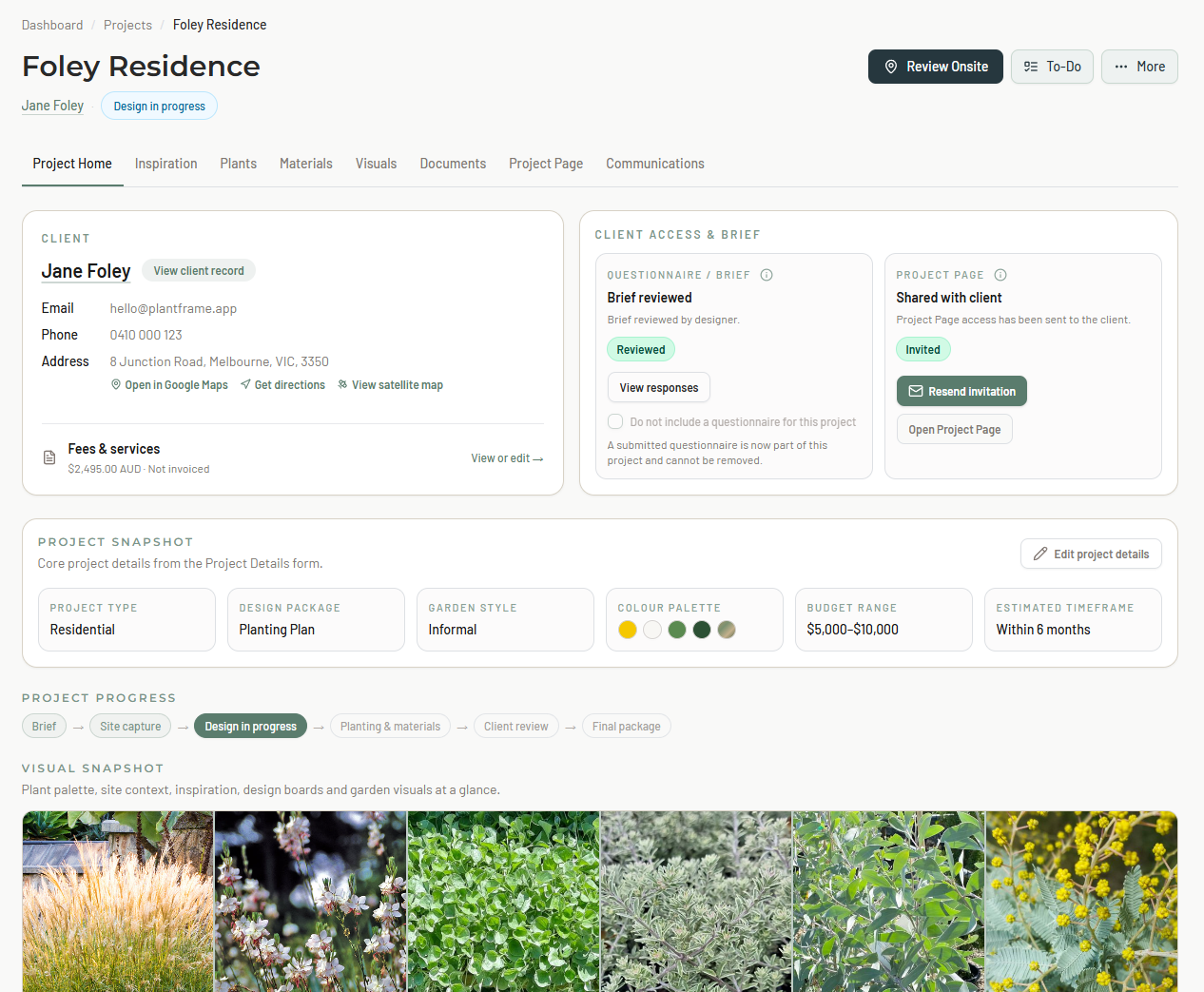
Client project pages
Present the project clearly in one client-facing place.
Visuals
Create project-informed garden visuals.
Approvals
Keep client review, comments and decisions together.
Plans & documentation
Planting plans, design boards, schedules and plant care guides.
Project handover
Plans, schedules and care information ready to share.
Just need the plant tools?
Research once. Save it. Find it again. Build palettes from what you already know.
HOW IT WORKS
Five stages. One connected project.
Capture
Site photos, notes, conditions, Plant ID and sketches.
Develop
Develop your plant palettes, materials, supplier links and project files.
Present
Create polished project pages, visuals and design presentations.
Approve
Clients review, comment and approve in one place.
Deliver
Share plans, schedules, care guides and final project information.
PLANT LIBRARY
Stop researching the same plant twice.
Build your own plant knowledge base, then actually use it.
Search by plant type, colour, growing conditions or keyword. Build palettes, find complementary plants, create care guides and bring existing plant lists into one organised library.
From A$19/month · 7-day free trial · No credit card
PROJECT-INFORMED GARDEN VISUALS
Turn your project into a visual.
Create garden visuals using the context already captured in the project — plants, zones, materials and design direction.
Spend less time rebuilding the brief and more time exploring the design.
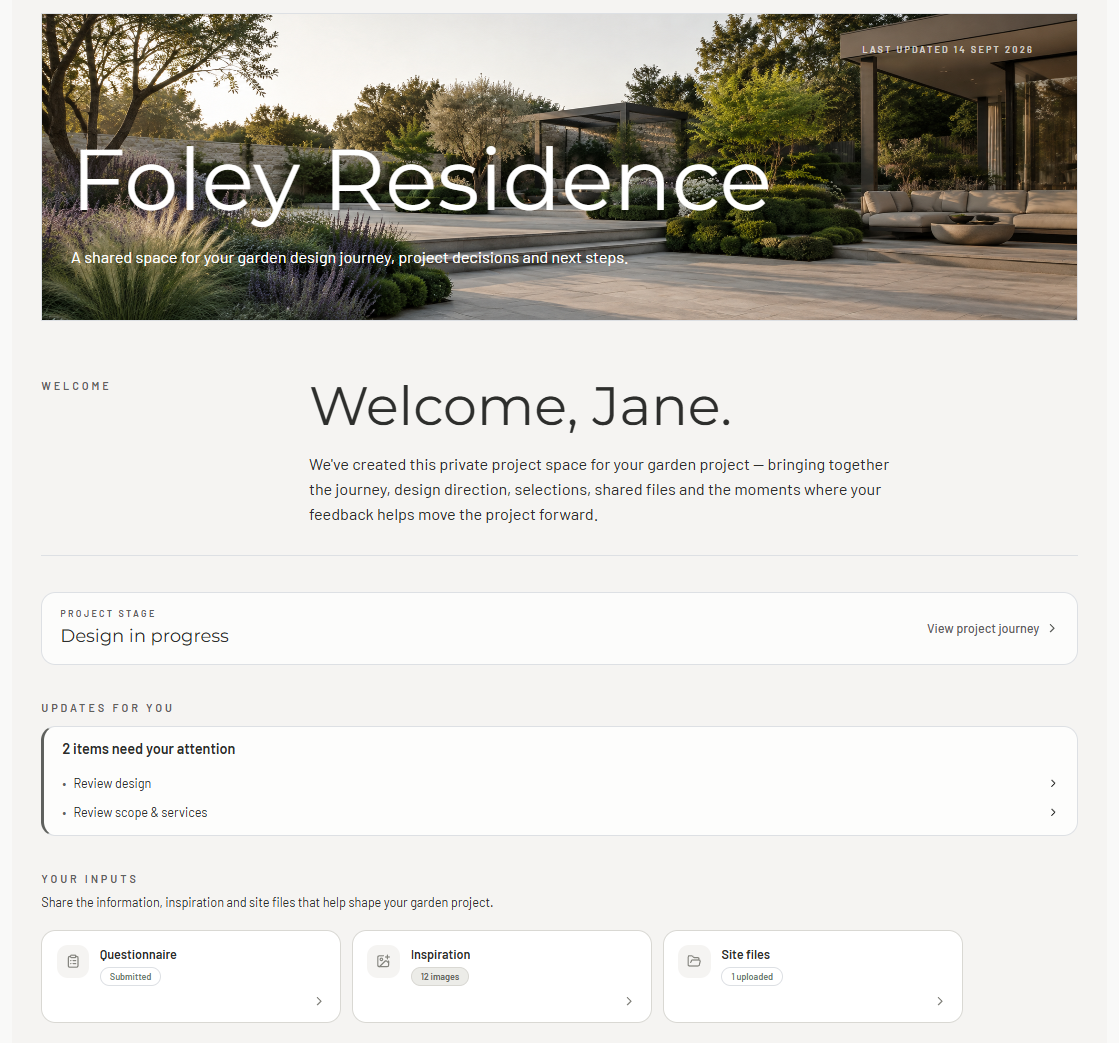
CLIENT PRESENTATION & APPROVALS
Keep the client experience as considered as the design.
Share plants, materials, visuals, designs and project decisions in one polished client-facing place.
Clients can review, comment and approve without needing access to your studio workspace.
Pricing
Simple pricing for
garden designers.
Start free. No credit card required.
Prices shown in Australian dollars. Final pricing confirmed at checkout.
Library
For plant-focused workflows
A dedicated plant workspace for researching, organising and reusing the plants you work with.
No credit card required.
- Your own searchable plant library
- Search by type, colour, A–Z and keyword
- Automated bulk plant import
- Plant data enrichment and horticultural review
- Plant image matching
- Plant care guides
- Plant Palette
- Complementary plant suggestions
Studio
For solo garden designers
The complete PlantFrame project workspace for solo garden designers — from site capture to client delivery.
No credit card required.
- 1 user
- 5 active projects
- Everything in PlantFrame Library
- Onsite capture and project debrief
- Plants, materials, and design direction
- Planting layouts and garden visuals
- Schedules, care guides and project documentation
- Client presentations, comments and approvals
- AI-assisted debriefs and project summaries
- Concept Visualisations allowance
Pro
For growing design studios
More capacity for studios managing multiple active projects, collaborators and client presentations.
No credit card required.
- 3 users
- 10 active projects
- Everything in Studio
- Higher AI-assisted summaries allowance
- Higher Concept Visualisations allowance
- Built for team members, admin support or collaborators
FAQ
Frequently Asked Questions
For many garden designers, yes. If your work centres on creating planting layouts from an existing base plan, managing plant quantities and preparing planting schedules, PlantFrame can provide the tools you need without a traditional CAD workflow.
For detailed site engineering, 3D modelling and comprehensive construction documentation, specialist CAD software may still be required.
Yes. You can upload existing plans and project files and keep them connected with the rest of the project.
Planting Layouts can also work from uploaded base plans, so you don't need to recreate an existing design just to use PlantFrame.
No. You can create your first project straight away and build your Studio Libraries as you work.
Existing plant lists can be imported, and the plants, materials and project information you add become reusable across future projects.
Yes. PlantFrame's Onsite workspace is designed for mobile use.
Capture site photos, notes, conditions, Plant ID results and sketches directly against the project while you're there, so the information is already connected when you're back in the studio.
Yes — and you control what your client sees.
Publish selected project information to a Client Project Page where clients can review plants, materials and designs, leave comments and approve decisions without needing access to your studio workspace.
PlantFrame is built on secure cloud infrastructure backed by SOC 2 Type II and ISO 27001 certification.
Data is protected using TLS encryption in transit and AES-256 encryption at rest, alongside access controls, security monitoring, penetration testing and encrypted backups within the underlying infrastructure.
The infrastructure supporting PlantFrame also provides data-processing safeguards designed to support international privacy requirements, including EU GDPR and UK GDPR and recognised mechanisms for lawful international data transfers.
For clarity: PlantFrame itself is not separately ISO 27001 or SOC 2 certified. These certifications apply to the underlying cloud platform and infrastructure used to deliver PlantFrame.
Studios with specific security, privacy or procurement requirements are welcome to contact us for further information about PlantFrame's data-processing and security arrangements.
You retain ownership of the original project content and design material you upload to PlantFrame.
Before cancelling, you should download or export any project records and outputs you need to retain for your business or clients.
Access to the workspace may be restricted after the subscription ends, and retained data is handled in accordance with PlantFrame's Privacy Policy, backup practices and applicable legal retention requirements.
Yes. PlantFrame is built and operated in Australia and can be used by garden design studios internationally.
The infrastructure supporting PlantFrame is designed around recognised international security and data-protection standards, including SOC 2 Type II, ISO 27001, EU GDPR and UK GDPR data-processing requirements.
Pricing can be viewed in a range of currencies on the website, with final pricing confirmed at checkout.
Ready to bring your whole project together?
Bring in a real project and see what changes when the whole workflow lives in one place.