
PLANTING LAYOUTS
Planting plans that stay connected to the project.
Create your planting layout directly in PlantFrame, or upload a planting plan created in your existing CAD software.
Either way, PlantFrame helps keep the plan connected to your project palette, Studio Plant Library, quantities and plant schedule.
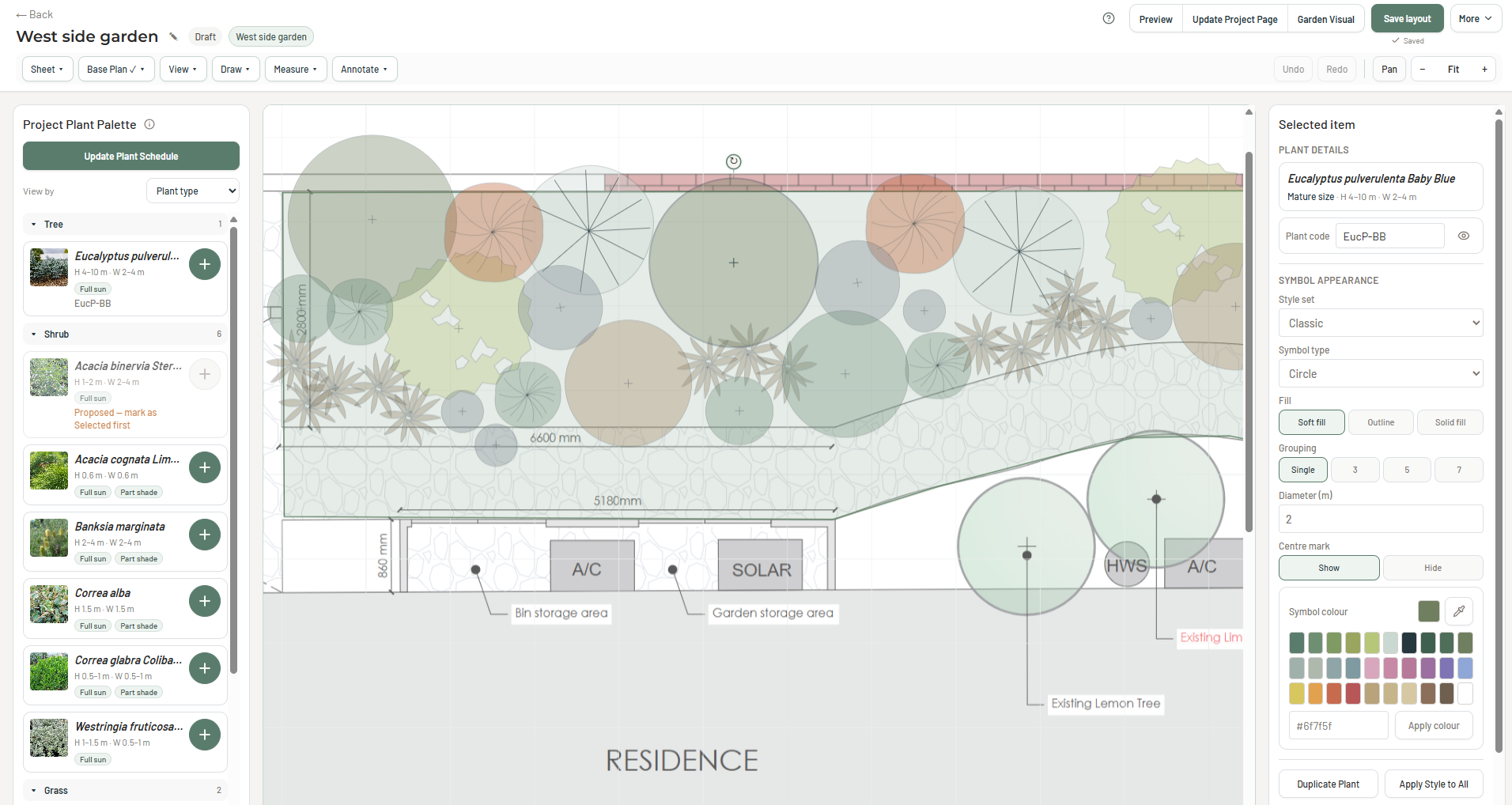
Or bring your CAD plan with you.
Start with plants already selected for the project, bring in a base plan and develop the planting layout directly inside PlantFrame.
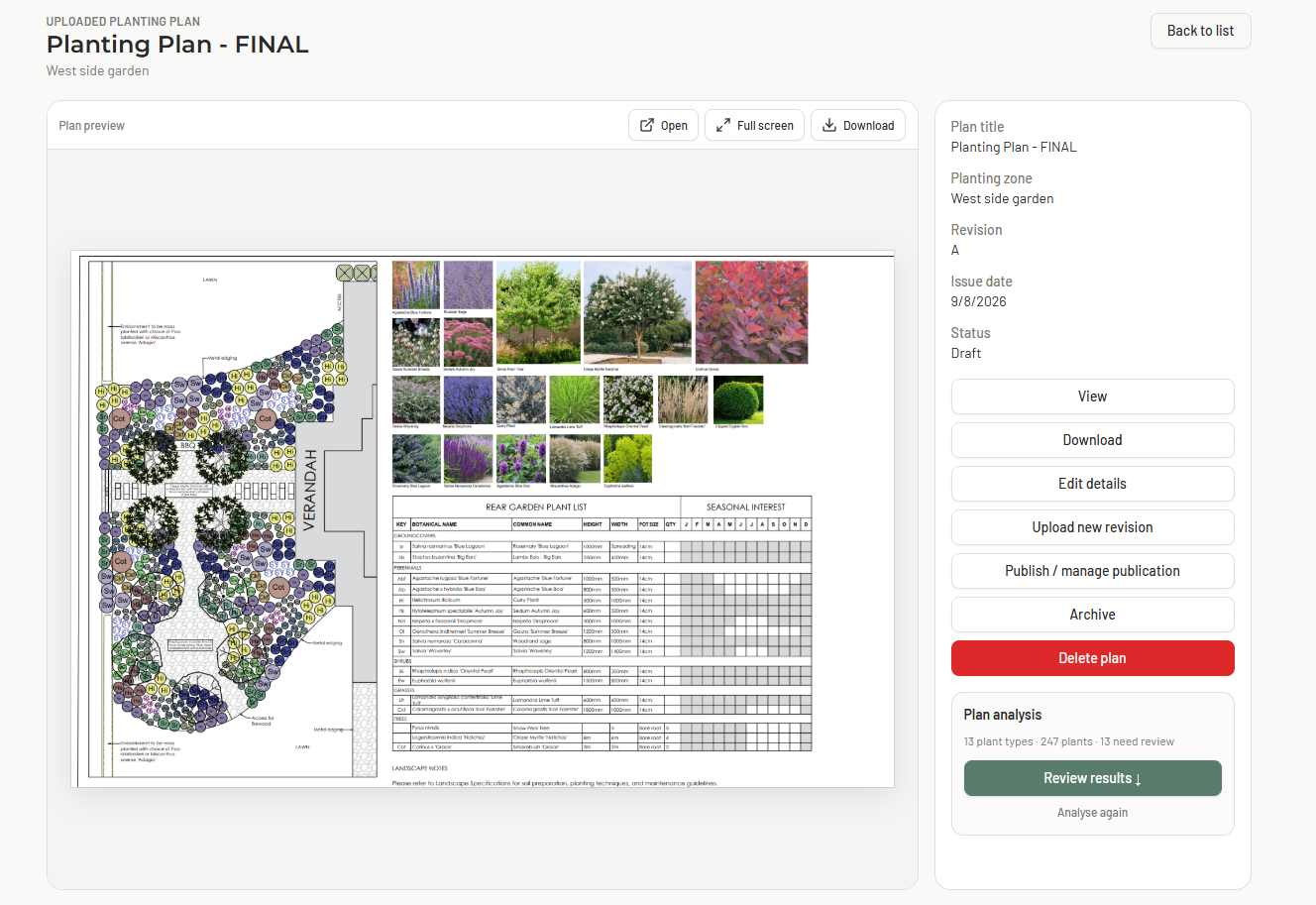
Keep using the CAD or landscape design software you already know. Upload the completed planting plan and bring its planting information back into the PlantFrame project.
Planting information that keeps moving
Whether the plan is created in PlantFrame or imported from CAD, the planting information stays connected to the project.
Project palette
Work from the plants already selected for the project.
Planting layout
Create the planting plan in PlantFrame or bring one in from CAD.
Quantities
Keep plant counts connected to what appears on the plan.
Plant schedule
Carry planting information through to the project schedule.
Project documentation
Use the connected information in the final project deliverables.
Create the plan your way.
Build it in PlantFrame or bring your existing planting plan with you.
PlantFrame keeps the planting information connected.
Frequently Asked Questions
What is planting plan software?
Planting plan software helps garden and landscape designers position plants on a scaled plan, manage quantities and prepare planting information for project documentation and installation.
Can I create a planting layout directly in PlantFrame?
Yes. You can upload an existing base plan, use plants already selected for the project and develop the planting layout directly inside PlantFrame.
Can I upload a planting plan created in other CAD software?
Yes. You can upload a planting plan created in other CAD or landscape design software. PlantFrame can parse and analyse the planting information in the plan so it can be reviewed and reconciled with the rest of the project.
What happens when PlantFrame analyses an uploaded planting plan?
PlantFrame can identify planting information contained in the plan and compare the detected plants with the project information already in PlantFrame. You can review the results before updating the project palette, adding new plants to the Studio Plant Library and updating the project plant schedule.
What happens if the planting plan contains plants that are not already in my library?
Plants identified in the uploaded plan can be reviewed before being added to the project or Studio Plant Library, helping capture new plants used in the design rather than leaving that information only inside the drawing.
Does PlantFrame replace CAD software?
For many garden designers, yes. If your work centres on creating planting layouts from an existing base plan, managing plant quantities and preparing planting schedules, PlantFrame can provide the tools you need without a traditional CAD workflow. For detailed site engineering, 3D modelling and comprehensive construction documentation, specialist CAD software may still be required.
Can I use plants from my project palette in the planting layout?
Yes. Plants already selected for the project can be used in Planting Layouts, reducing the need to rebuild your plant specification when you move into the plan stage.
Does Planting Layouts update the plant schedule?
Yes. Planting information and quantities can be carried through to the project plant schedule, helping keep the schedule aligned with the planting design.
Can I export my planting layout as a PDF?
Yes. Planting layouts can be prepared for PDF export as part of the project’s final documentation.